Reading time: 7–8 minutes
TL;DR
Need parental controls across PS5/Xbox/Switch/PC/mobile but don’t want to click through ten different menus? Use our free Parental Controls Plan Generator to create a personalized, printable PDF with screen-time limits, purchase rules, chat settings, and platform-specific steps. It’s privacy-first all setup happens in your browser.

Why this tool exists
Every platform handles parental controls a little differently, and the right settings change by age. That makes setup confusing and time-consuming. GameInCharge built the Parental Controls Plan Generator to give families a single, simple plan they can follow in 10–15 minutes no guesswork, no data sharing, and clear, step-by-step instructions for each device you own.
What you can do with the Parental Controls Plan Generator
-
Create a household plan: weekday/weekend playtime, bedtime cutoff, max content rating, chat/privacy rules, purchases.
-
Get platform-specific steps for: PS5/PS4, Xbox Series/One, Nintendo Switch, Steam (PC), Windows (Family Safety), Android (Family Link), iOS (Screen Time).
-
Export a professional PDF: easy to print, share, or revisit later.
-
Stay transparent: every plan shows the date and how the rules were chosen (age-based defaults you can override).
-
Keep your privacy: the tool runs client-side; no personal data is uploaded.
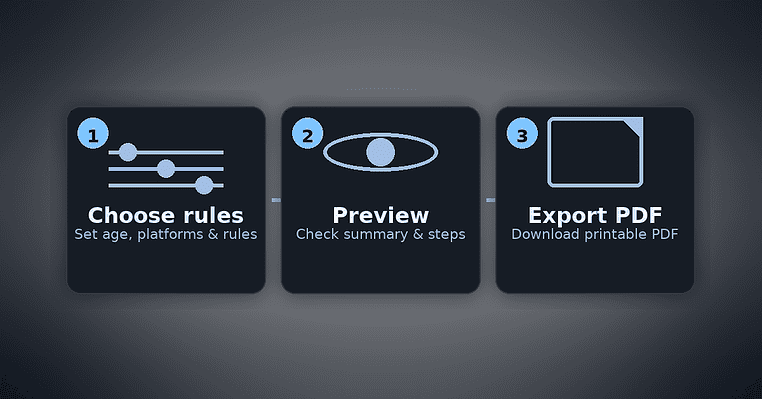
How it works (3 easy steps)
-
Open the generator
Go to Tools → Parental Controls Plan Generator or click here: Open the tool. -
Choose your family rules
-
Select your child’s age bracket (6–8, 9–12, 13–15, 16–17).
-
Tick the platforms you own.
-
Set weekday/weekend minutes, bedtime, max content rating (ESRB/PEGI), chat rules, and purchases (block, PIN, or monthly cap).
-
Use the age defaults and tweak anything you like.
-
Preview & export
-
Review the Quick Card (summary) and per-platform checklists.
-
Fix any pre-flight warnings (e.g., select at least one platform, add a spending cap amount if chosen).
-
Click Download PDF or Print.
Tip: Keep the PDF handy on your phone or fridge. As your child grows, re-run the generator and update the plan in seconds.
What’s inside your printable plan
-
Quick Card: all rules at a glance weekday/weekend limits, purchases, chat, rating, bedtime.
-
Step-by-step for each platform: the exact menu path and toggles to set (e.g., “PS5 → Settings → Family and Parental Controls → …”).
-
Official help links: direct links/QR codes to the platform’s latest documentation.
-
Notes & sign-off: space to add exceptions, one-time passes, or a “family agreement.”
Recommended starting presets (you can change these anytime)
-
Ages 6–8: 45 min weekdays / 90 min weekends, no voice chat, purchases blocked, content up to E/3+.
-
Ages 9–12: 60 / 120 min, friends-only chat, PIN for purchases, E10+/7+.
-
Ages 13–15: 90 / 150 min, friends-only chat, monthly spending cap, up to T/16+.
-
Ages 16–17: 120 / 180 min, chat allowed (with boundaries), monthly cap, up to M/18+ (parent’s call).
These are reasonable starting points. Always adjust for your child’s maturity, school schedule, and your family values.
Platform coverage (what the tool guides you through)
-
PlayStation (PS5/PS4): play-time limits, purchases PIN, communication controls, game age levels.
-
Xbox (Series/One): screen time, “Ask to Buy,” communication privacy, age-based content.
-
Nintendo Switch: Parental Controls mobile app (limits + bedtime alarm), purchase controls, age filters.
-
Steam (PC): Family View, store & community restrictions, OS-level screen-time pairing.
-
Windows (Family Safety): screen time, spending, content filters, schedules.
-
Android (Family Link): daily limits, bedtime, Play Store approvals, age filters.
-
iOS (Screen Time): app limits, downtime, purchase requirements, communication limits, content restrictions.
Privacy & trust
-
The generator runs entirely in your browser (client-side).
-
We don’t store child names or household data.
-
If you choose to email yourself the PDF in the future, we’ll offer a serverless send with no persistent storage of the PDF contents.
When to revisit your plan
-
At the start of a new school term.
-
After a major platform update or new device.
-
On birthdays or age milestones (e.g., moving from 12 to 13).
-
If playtime or online interactions start to affect sleep, grades, or mood.
Consistency beats perfection. A clear, agreed plan reduces friction and helps kids build self-control.
Frequently asked questions (FAQ)
Is the tool really free?
Yes. The generator and PDF export are free. We may recommend useful accessories (headsets, controllers, UPS) with affiliate links to support the site.
Do you upload any of my info?
No. The plan is generated locally in your browser. Nothing is sent to our servers.
What if platform menus change?
We keep our steps current, but UI labels can shift. If you spot a difference, follow the closest match and check the official help link in your PDF.
Can I set different limits for weekdays vs weekends?
Yes. Enter separate minutes for weekdays and weekends or use the age defaults.
How do I handle exceptions (exams, holidays)?
Use the Notes area in your PDF to write a one-time exception and a return-to-normal date. Consistent routines help kids understand boundaries.
Is there a “best” age rating?
Follow ESRB/PEGI guidance, then apply your family’s values. The tool lets you set a maximum rating you’re comfortable with.
Can I use this if I’m not a parent?
Absolutely. Many adults use these controls to spend smarter, avoid impulse purchases, and protect sleep.
Try it now
Ready to simplify setup?
👉 Open the Parental Controls Plan Generator and export your plan in minutes.
